It's a faith in technology.

Blogger or Wordpress Who is the Best

A constant debate is simply Blogger vs Wordpress. My quick post here is going to give you my personal opinion on it, with no technical info.

I would first like to say I currently like Blogger more than Wordpress. Read on to find out why.
Well, I like Blogger (for now) is because it's a lot more flexible when hosted by the default company. In Wordpress.com, you cannot change the theme or install plugins. You can in Blogger. But of course when it's self-hosted, all that changes. Wordpress has millions of more features than Blogger, bigger userbase, better plugins. Blogger is great for small, quick posts while Wordpress is great (Amazing) for professionals and novices alike.

End? Use Blogger if you want the free hosting with more features on your blog. Have your own host? Wordpress is the only way to go.

How to Get More Traffic to Your Blog

You will need visitors to your site that are looking for exactly what you are offering, which is known as targeted traffic. Here are ten proven ways you can drive quality traffic to your affiliate marketing business site and increase your online income.


1. Write Articles For Your Own Blog

Well-written, informative how-to articles are proven traffic baits for affiliate marketing business sites. Use the resource box to provide additional links and include links in the content body to similar or additional information that can only be read on your site.

2. Create Email campaigns

Email campaigns, used carefully, can easily drive targeted traffic to your affiliate marketing business site. By providing highly relevant and valuable information in the body of the email message and then offering a link that will take the recipients to your site.

You can provide the full content in the email message and then offer a link inviting the recipient to view more similar write-ups on your site. Or give only a portion of the content in the email and offer the rest on your affiliate marketing site. A link in your signature should also be provided.

4. Ezines and Newsletters

Information is what people are searching for on the internet. By using proven methods to drive targeted traffic to your affiliate marketing business and offering a free ezine or newsletter about the subjects your visitors are interested in, will result in many visitors opting-in to receive your information.

Offer your visitors free bonuses such as eBooks for signing up to your free newsletter. Either use a separate landing page to handle the subscription process or have the subscription box placed above the fold on your website where it is clearly visible.

5. Use Discussion boards and forums

You can encourage other members to react and send you a reply by leaving useful and thought-provoking comments on discussion boards and forums. This will enable you to build a networking relationship from here. Be sure to sign with a link back to your affiliate marketing business website.

6. Social bookmarking sites

You will find that these sites are a rich source of targeted traffic that you can drive to your affiliate marketing business site. Your market demographics are also easier to define so sending out invitations to potential leads and members is much simpler.

7. Allow bookmarks on your web pages

You can drive traffic to your affiliate marketing site by allowing your readers to bookmark certain pages that contain good content. This will help promote those pages and your website to other people who might be interested in the same subjects.

8. Offer freebies!

Everybody loves a freebie! There’s nothing like a free gift to drive targeted traffic to your affiliate marketing site. It’s easy to implement and can be relatively cheap or even free. Also, you can offer these visitors an incentive to sign up for whatever campaign it is you are promoting.

SEO Friendly Blog Title


This is a simple things to make your title of your blog always SEO friendly.
Follow Some Steps to Change Some Code in Your Blog Template

Layout>edit HTML

Find code at your template

<data:blog.pageTitle/>

Replace With The Following

<b:if cond='data:blog.pageType == "index"'>
<title><data:blog.title/></title>
<b:else/>
<title>>data:blog.pageName/></title>
</b:if>

Finished! Now you have an SEO-friendly page title.

Make Colorful Tables in BlogSpot


BlogSpot blogs are rich with options that gives you freedom to design and create whatever you want using CSS and HTML. Blogger post editor doesn't has the option of creating HTML tables but no worries we can make tables with rows and columns ourselves and not just dull grey tables, fully customized tables with background colors and smooth and neat edges and borders. This  tutorial will be divided in two parts for simplicity. The first part will give you basics of understanding the structure of tables and the second part will let you customize the tables. After reading both parts you will be able to create MS Excel type style sheets and much more.

How To Create HTML Tables For Blogger Blogs?

This is how a simple table code with 2 rows and 2 columns looks like,
<table border="1" cellspacing="0" cellpadding="2" width="400"><tbody>

   <tr>
      <td>Row 1, Column 1</td>
      <td>Row 1, Column 2</td>
    </tr>
    <tr>       <td>Row 2, Column 1</td>
      <td>Row 2, Column 2</td>
    </tr>

  </tbody></table>

This code will create the following table,
Row 1, Column 1Row 1, Column 2
Row 2, Column 1Row 2, Column 2
Now lets understand some basics of this HTML structure:
Understanding every basic is not required for you as bloggers so I would be sharing things that may not create confusion and yet prove really helpful.
(1)  The starting and ending brown highlighted areas shows the start and end of your table structure. Where I have set border="1" and if you don't want borders then set border="0". There you can also see cellspacing and cellpadding. Just let let as it is. To set width of the table you will need to control width="400"
(2)  The tag <tr> indicates a row and tag <td> indicates a column. In the above table you can see two columns in a single row. This is because I have added two <td> tags inside <tr>and </tr> . This part of code is represented by,
<tr>
      <td>1</td>
      <td>2</td>
    </tr>

If you wish to add 3 columns to a single row then we would add <td> thrice ,
<tr>
      <td>Column-1</td>
      <td>Column-2</td>
       <td>Column-3</td>
    </tr>
What if you want 2 Rows and each row contains 4 columns? Here goes the complete code,
<table border="1" cellspacing="0" cellpadding="2" width="400"><tbody>
<tr>
      <td>Column-1</td>
      <td>Column-2</td>
       <td>Column-3</td>
           <td>Column-4</td>

    </tr>
<tr>
      <td>Column-1</td>
      <td>Column-2</td>
       <td>Column-3</td>
       <td>Column-4</td>

    </tr>
  </tbody></table>
Two <tr> tags because we created two rows and 4 <td> tags in each row because we want 4 columns. The result would be,
Column-1Column-2Column-3Column-4

That's all for this post. The next post will take you a level further in letting you understand how to add backgrounds to each table cell and I am sure you will like it more.

Increase Alexa Rank Tips

Below is quick tips  how to increase/reduce alexa rank:

  1. Install the Alexa toolbar or Firefox’s SearchStatus extension and set your blog as your homepage. This is the most basic step.
  2. Put up an Alexa rank widget on your website. I did this a few days ago and receive a fair amount of clicks every day. According to some, each click counts as a visit even if the toolbar is not used by the visitor.
  3. Encourage others to use the Alexa toolbar. This includes friends, fellow webmasters as well as site visitors/blog readers. Be sure to link to Alexa’s full explanation of their toolbar and tracking system so your readers know what installing the toolbar or extension entails.
  4. Work in an Office or own a company? Get the Alexa toolbar or SS Firefox extension installed on all computers and set your website as the homepage for all browsers. Perhaps it will be useful to note that this may work only when dynamic or different IPs are used.
  5. Get friends to review and rate your Alexa website profile. Not entirely sure of its impact on rankings but it might help in some way.
  6. Write or Blog about Alexa. Webmaster and bloggers love to hear about ways to increase their Alexa rank. They’ll link to you and send you targeted traffic (i.e. visitors with the toolbar already installed). This gradually has effects on your Alexa ranking.
  7. Flaunt your URL in webmaster forums. Webmasters usually have the toolbar installed. You’ll get webmasters to visit your website and offer useful feedback. It’s also a good way to give back to the community if you have useful articles to share with others.
  8. Write content that is related to webmasters. This can fall in the category of domaining and SEO, two fields in which most webmasters will have the Alexa toolbar installed. Promote your content on social networking websites and webmaster forums.
  9. Use Alexa Siteinfo on your website URL. Try this: http://www.alexa.com/siteinfo/bungtutor.blogspot.com . Replace thebestsolver.com with the URL for your website. Leave this redirected URL in blog comments as well as forum signatures. This redirect will count a unique IP address once a day so clicking it multiple times won’t help. There is no official proof that redirects positively benefit your Alexa Rank, so use with caution.
  10. Post in Asian social networking websites or forums. Some webmasters have suggested that East Asian web users are big Alexa toolbar fans, judging by the presence of several Asia-based websites in the Alexa Top 500. I suggest trying this only if you have the time or capacity to do so.
  11. Create a webmaster tools section on your website. This is a magnet for webmasters who will often revisit your website to gain access to the tools. Aaron Wall’s webpage on SEOTools is a very good example.
  12. Get Dugg or Stumbled. This usually brings massive numbers of visitors to your website and the sheer amount will have a positive impact on your Alexa Rank. Naturally, you’ll need to develop link worthy material.
  13. Use PayperClick Campaigns. Buying advertisements on search engines such as Google or Exact Seek will help bring in Traffic. Doubly useful when your ad is highly relevant to webmasters.
  14. Create an Alexa category on your blog and use it to include any articles or news about Alexa. This acts as an easily accessible resource for webmasters or casual search visitors while helping you rank in the search engines.
  15. Optimize your popular posts. Got a popular post that consistently receives traffic from the search engines? Include a widget/graph at the bottom of the post, link to your Alexa post or use Alexa redirection on your internal URLs.
  16. Buy banners and links for traffic from webmaster forums and websites. A prominent and well displayed ad will drive lots of webmaster traffic to your website, which can significantly boost your rank.
  17. Hire forum posters to pimp your website. Either buy signatures in webmaster forums or promote specific articles or material in your website on a regular basis. You can easily find posters for hire in Digital Point and other webmaster forums.
  18. Pay Cybercafe owners to install the Alexa toolbar and set your website as the homepage for all their computers. This might be difficult to arrange and isn’t really a viable solution for most. I’m keeping this one in because some have suggested that it does work.
  19. Use MySpace . This is a little shady so I don’t recommended it unless you’re really interested in artificially inflating your Alexa Rank. Use visually attractive pictures or banners and link them to your redirected Alexa URL. This will be most effective if your website has content that is actually relevant to the MySpace Crowd.
  20. Try Alexa auto-surfs. Do they work? Maybe for brand new sites. I think they are mostly suitable for new websites with a very poor Alexa rank. Note that there be problems when you try to use auto surfs alongside contextual ads like Adsense. They aren’t also long term solutions to improving your Alexa Rank so I suggest using with caution.

Top Seven Ways to Make Money Online

Top Ways to Make Money Online
Now days, it is certainly possible to make money online. Whether you want to supplement your income source or to make a full-time income. Can be done without investing a single cent from your pocket ever, learn how to make money online. In this article I outlined top ways to make money online including blogging, selling e-books, and even affiliate marketing. Feel free to explore the ideas on this site, join the discussions under article or suggest an idea we haven’t thought of yet.


1-Blogging

There are two ways to make cash through blogging: either by earning commission from advertising banners placed on your own blog or by engaging in the practice of “sponsored” blogging. Google’s Ad Sense remains one of the most popular solutions. Just establish yourself a decent blog, configure the ads and see what happens. Sponsored blogging on the other hand is an altogether more calculated affair, many websites such as Blogitive and PayPerPost providing a platform through which companies essentially contract bloggers to post favorable content about their products in exchange for cash. An Example of blog is http://bloggerstrick.blogspot.com/ itself.

2. Affiliate Marketing


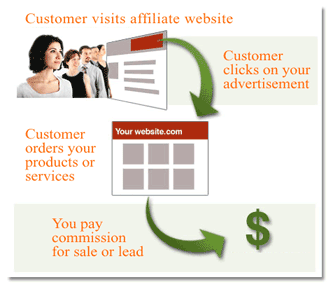
Affiliate marketing business is one of the effective ways of generating revenue on the internet. All big players’ success lies in this expertise. Affiliate marketing business is the way of promoting ones business through affiliates and affiliates are paid commission when they make a sale. In layman terms “people selling other’s product and receive commission accordingly”
For this technique of online money making you would need to join any affiliate networks, there so many but recommended is Clickbank.com. Sign up and create free account there.
Research the market product. You can choose the product that is currently hot and is selling a lot. Then create a separate website for each product. Afterwards get the targeted traffic to your product

3. Writing Reviews or Writing Letters


One of the most popular reasons many people use the Internet is to research products before buying them. This is the most important and most popular content online. If you are good at writing product reviews, then there are countless opportunities to earn income from your written opinions.
If you are the best person among your friends at the letter writing? Then consider spending your summer creating custom letters atLetter Rep. Yes, this website isn’t exactly the best of the site in the world – but by submitting letters to custom letter, you stand to earn $10 per letter. Not only that, future visitors to the site can also purchase your letters, making your pile of work a wonderful source of residual income.

4. Programming

If you are an ace programmer then you would end this summer with thousands of dollars under your belt. Whether you are skilled at C/C++, Java, flash or can build professional websites from scratch or even like to make some games on the side, there are numerous freelance programming work opportunities online. Even if you have a full time software design job, you could find something that you could accomplish quickly and make some extra money as well. Elance covers everything from programming and writing to consulting and design, while RentACoder focuses on software, natch.

5. Flipping Websites and its domain

Domain flipping is the process of buying a domain name and sells it later for more money. If you find yourself easy in little bit more effort then you will be earning more cash with little more investment of time. First find a today’s online hot topic and build up a website having unique domain name, building up a website and keep on building it up until it gets noticed by the people in the relevant subject. This will cost you some time as it gets indexed by the Google. After wards you can sell it to someone else.
If the above method is not appealing to you then buy a website which is having some reasonable traffic at the moment. It requires some research effort from you regarding keyword. Now you should develop it in order to build the traffic. After a few months when you start earning dollars you can think about selling it to cash your research and dev work.

6. Selling photos


If you regularly have Wow! Awesome! and aWWw!comments on your flicker accounts then it means you are destined for photographic greatness or may be for some extra dollars, by selling your photos on stock photography sites such as Fotolia, Dreamstime,Shutterstock, and Big Stock Photo. It is simply to get your photos out in public which means there is tremendous amount of competition but it also builds up a secondary source of income for you.

7. Make Money from Ebay


Ebay is a great place to go when you want to buy something that’s not available in your area. Not only you can buy great items on Ebay, you can make lot of money using the most popular internet auction resource. You can sell the items on Ebay that you no longer want like iPods, DVD players, MP3 players, computers. And also very popular are books, jewelry, movies, clothes and cars to make more and more money. If you are good at selling then why not start selling on Ebay, buy items at wholesale prices and sell them for a bit more.

PageRank or Alexa Rank? Which One Is Important

PageRank or Alexa Rank? Which One Is Important?

 Google Page Rank and Alexa ranking are two different ways determine your site's performance. Here is a little description of the two,


Google Page Rank 

Google Page Rank is a rank from 0 to 10. It is the way Google observes a website. It is mostly dependent upon how many quality backlinks the site has. However there are many other features that also count. Sometimes Google ban people from the ranking due to several reasons like copied content and black hat SEO tactics. . It is calculated from an algorithm (can be seen here :Wiki PageRank. )

Positive Aspects:

  1. A good way to observe sites performance as it uses quality backlinks as a major factor. Follows an algorithm (attach algorithm link here Wiki).
  2. Can ban websites with copied content.
  3. Ranked by the biggest search engine in the world i.e GOOGLE
  4. Mostly Page Rank is considered a major factor when buying or selling a site.
  5. Calculated by Google itself which is major site that sends traffic.
  6. Offers a toolbar named 'Google Toolbar' to check the Alexa ranking of a site

Negative Aspects:
Updated very late (3-4 months)
People can buy quality backlinks and get good Page Rank.
They do not provide a toolbar for their own Google Chrome

Alexa Ranking 

Alexa is a web directory and  provides free traffic metrics, search analytics, demographics, and more. Alexa ranking depends upon how many visitors you get daily.
Positive Aspects:

  1. Updated sooner
  2. Calculation is based on a dependable factor i.e visitor count.
  3. Offers a toolbar named 'Alexa Toolbar' to check the Alexa ranking of a site.
Negative Aspects:
You can use a software and get as robot visits to your site and increase your hit count.

Conclusion:


Observing both the two factors it is seen that none of them actually is a perfect way to describe the success of a website. Both of them have their pros and cons. However PageRank gives an idea of how popular a website is in internet in building reputation and Alexa gives an estimate idea of how much traffic a website is receiving. In short both are important to receive handsome sponsorship and attract tons of Advertisers

Add +1 Button To Homepages To Increase Traffic

Add +1 Button To Homepages To Increase Traffic
 This is an important step that you must take the sooner possible. Google has expectations with this new social networking plugin and future ranking listings will be mostly based on personal recommendations based on your blogs and sites. We already added the +1 buttons below Posts in blogger and now it is time that you add one especially dedicated to the number of +1'ds made on your homepages. You can see this button added to the right of my navigation menu so that users could easily +1'd the homepage.

How to add +1 Button to Homepage?
Select a HTML/Javascript widget and paste the following code inside it,
<g:plusone href='http://www.blogtechworld.com' size='standard'/> 
If you want one like mine then use this code,
<div style='float:right'>
      <p style='font:12px bold arial, verdana; float:left; margin:5px; 15px;'>Liked us?</p>
<g:plusone href=' www.blogtechworld.com' size='standard'/>
</div>
Make sure to replace my blog link with yours.
2.   If you have previously added the +1 buttons to your blog then you can skip this step else continue. 
  • Go To Blogger > Design > Edit HTML
  • Backup your template
  • and search for this
</head>
and just above it paste the following code,

<script src='http://apis.google.com/js/plusone.js' type='text/javascript'> {lang: &#39;en-US&#39;} </script>

  3. Save your template and you are done!

Which Social Networking Buttons Should You Use On Blogs

Which Social Networking Buttons Should You Use On Blogs?


Web Traffic a word heard everywhere and to achieve it, web owners will try every possible method to push themselves to a better level. In order to achieve web traffic the simplest and most effective solution is the use of Major Social networking websites. With the rapid advancement and development of Internet, more and more bloggers and webmasters are getting addicted to social tools and services for the purpose of inorganic traffic flow. Social networks are expanding widely and every year we hear of another name. By far there are over 350 big and small social connecting sites. Just a month ago we heard of Google+ and God knows how many more will evolve in future.

The question here is that which social buttons should you use in order to increase the number of your unique visitors and thereby daily page views. It really destroys readers interest when he sees too many buttons on your site, eating their internet speed with their heavy load time. Providing efficient and easy navigation to user should be our goal. If you add each and every social media buttons like Digg, reddit, delicious, Twitter, technorati, Facebook like button, Facebook send button, Google +1  button, linkedin, stumbleupon and so on then obviously you are increasing your web blog load time discouraging both visitors and search engines. Readers enjoy fast load time and search engine robots enjoy crawling data at a faster rate. According to Google new webmaster guidelines, all websites with slow load time are penalized by Google and will be ranked low in SERP (Search Engine Result Page). So lets select the best traffic value buttons for your blogs.
Give Priority To Big Social Networks
By big I mean social networking websites with extremely high traffic and audience value. Use social buttons which have the greatest number of online registered users for example Facebook. It has around 750 Million active registered users. The probability that your visitor is a Facebook user is near to 90% so make sure you Keep Facebook at the top of your priority list. Second comes Twitter with 175 Million users.  Third comes the new social Giant though new but soon it will expand like fire and this new giant is of course Google+. Fourth comes LinkedIn with over 100 Million active users.

Social Networks That Counts Second

nnNow lets look at the traffic value of some other social networking sites that comes in our second priority list.

These names include Stumbleupon with 7 Million users, Digg with approximately 1 Million registers users and reddit.

Now here goes the order of priority from best to least best:

  1. Facebook
  2. Twitter
  3. Google+
  4. Linkedin
  5. StumbleUpon
  6. Reddit
  7. Digg

You must Keep the first 4 buttons as the main social sharing buttons on your blogs and keep others on Addthis Share button which contains over 350 social networking sites. This way you keep the load time performance of your blog high and will receive a handsome traffic in return.

What buttons do we use?

You can see Twitter, Facebook Like, Stumbleupon and Google+ buttons as our main focused buttons on OUR Blog and that is contradictory to the priority list I shared above. I have skipped Linkedin because it is mostly used by business professionals and my site does not address them therefore I have used stumbleupon instead. So you should decide yourself which buttons are more important for your blog's growth and success.

You can use the following social networking widgets for customizing your blogs:

    * Add Social Networking buttons below titles
    *  Social Networking widget below posts

I have published many widgets on social networking buttons. You can use the search box above to choose the best widget design for your blog.


Create a Contact Form With File Upload Option

Create a Contact Form With File Upload Option

The contact form that I am using on this blog is from emailmeform and it is all free but customized using CSS. I previously published a post on how to customize contact form provided by emailmeform but later due to change in the coding provided by them the styling do not work for new forms so today we will learn to create a simple contact form with no company Ads and along with an upload option that will allow your visitors to send you files straight from your website. The files can be a text file, video, audio, pdf, gif, png, anything. Follow these steps


Create a Free Web Contact Form

Sign up for a free account at emailmeform
Once you are registered click the "Add a Form" button and choose the form builder option

Keep your form simple with some important fields only like Name, Website URL, Email, Age, Country, Subject and Message. The form builder looks like this,
The form builder has blue buttons at left and display at right. When you click a button on left the effect is displayed on right. Now kindly follow as I instruct for keeping things simple and for creating a simple but informative contact form.
Follow this order:
  1. Click the Name button in advance section
  2. Next click Web site
  3. Next Email
  4. Next Hidden Field. Now click the hidden field section on the right and rename it as Age
  5. Next click Hidden Filed again and rename it as Country
  6. Next click File Upload (Optional you can leave this option if you don't want users to send you files via email)
  7. Now From the Basic section click Paragraph Text & click it to rename it as Message
  8. To make a specific form option a must to fill then simply click that row and select required as shown below
Your contact form now must look something like this:
9. Click the Form Title and add some message there for your visitors. For example you can write :
We Love To Hear From You
Feel free to ask for any help. We will catch you back as soon as time allows
I just hope you may have found today's tutorial helpful. If you need any help please do not hesitate to post your question. Have fun buddies! :)


Source
 

Receive all updates via Facebook. Just Click the Like Button Below

You can also receive Free Email Updates: